
SvelteKit Todo App with Firebase

TL;DR#
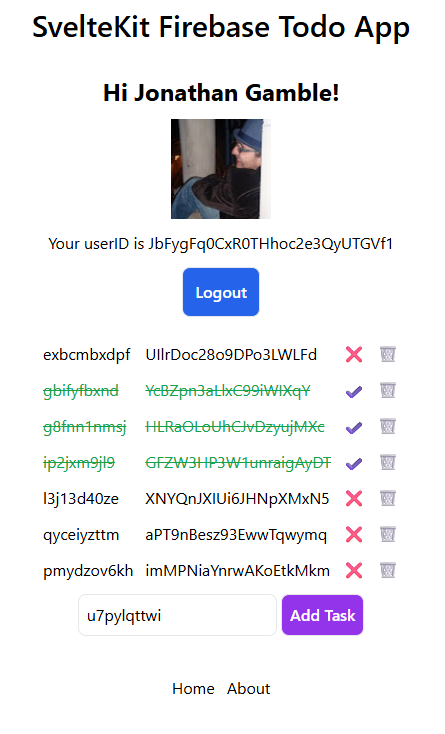
This version of my Firebase Todo App runs on SvelteKit, uses Tailwind, and is used as the basis for a lot of my demo apps. The key to fixing problems is how you export your auth variable, and making sure you are using it correctly. Don’t overcomplicate your SvelteKit. The usage of the $derived rune and $effect insures your database connections are using unsubscribe mechanisms correctly when there is no user. I have also create a server only route for the about page. You can use Firebase on Cloudflare as long as you don't need authentication.
Firebase Setup#
lib/firebase.ts#
I like to keep my firebase initializer file very simple. We initialize an app once from our .env file, if there is none, and export the database and auth variables to be used later.
import { PUBLIC_FIREBASE_CONFIG } from '$env/static/public';
import { getApp, getApps, initializeApp } from 'firebase/app';
import { getAuth } from 'firebase/auth';
import { getFirestore } from 'firebase/firestore';

const firebase_config = JSON.parse(PUBLIC_FIREBASE_CONFIG);


export const app = getApps().length
    ? getApp()
    : initializeApp(firebase_config);

export const auth = getAuth(app);
export const db = getFirestore(app);
.env#
Your .env file should contain all the firebase config information. Make sure to put quotes around the keys.
PUBLIC_FIREBASE_CONFIG={"apiKey":"...","authDomain":"..."...}
svelte.config.js#
I also use an alias for the components folder.
const config = {
	// Consult https://kit.svelte.dev/docs/integrations#preprocessors
	// for more information about preprocessors
	preprocess: vitePreprocess(),

	kit: {
		alias: {
			"@components/*": "./src/components/*"
		},
...
app.d.ts#
We can create reusable types in SvelteKit by adding them to our types file. We will never have to import them in our app, and they will be available everywhere.
declare global {

	type UserType = {
		displayName: string | null
		photoURL: string | null;
		uid: string;
		email: string | null;
	};

	type UserState = {
		loading: boolean,
		data: UserType | null
	};

	type TodoDoc = {
		id: string;
		uid: string;
		text: string;
		complete: boolean;
		createdAt: Date;
	};

	type AboutDoc = {
		name: string;
		description: string;
	};

	namespace App {	}
}
App Structure#
routes/+error.svelte#
SvelteKit has a page to handle errors.
<script lang="ts">
	import { page } from '$app/state';
</script>

<main class="flex flex-col items-center gap-3 p-5 text-center">
	<h1 class="text-3xl font-semibold">{page.status === 404 ? 'Page not found' : 'Something went wrong'}</h1>
	<p>{page.error?.message}</p>
	<a href="/" class="text-blue-600 underline">Go home</a>
</main>
Authentication#
lib/auth.svelte.ts#
We create an auth library with authentication functions.
import {
    GoogleAuthProvider,
    onIdTokenChanged,
    signInWithPopup,
    signOut,
    type User
} from "firebase/auth";
import { FirebaseError } from 'firebase/app';
import { getContext, onDestroy, setContext } from "svelte";
import { auth } from "./firebase";

// User context key
const USER_KEY = Symbol('user');

export const loginWithGoogle = async () => {
    try {
        await signInWithPopup(auth, new GoogleAuthProvider());
        return { error: null };
    } catch (error) {
        if (error instanceof FirebaseError) {
            return { error: error.message };
        }
        throw error;
    }
};

export const logout = async () => {
    try {
        await signOut(auth);
        return { error: null };
    } catch (error) {
        if (error instanceof FirebaseError) {
            return { error: error.message };
        }
        throw error;
    }
};

export const setUser = () => {

    const user = $state<{ value: UserState }>({
        value: {
            loading: true,
            data: null
        }
    });

    // Create user listener
    const unsubscribe = onIdTokenChanged(
        auth,
        (_user: User | null) => {

            // not logged in
            if (!_user) {
                user.value = {
                    loading: false,
                    data: null
                };
                return;
            }

            // logged in
            const { displayName, photoURL, uid, email } = _user;
            user.value = {
                loading: false,
                data: { displayName, photoURL, uid, email }
            };
        });

    setContext(USER_KEY, user);

    onDestroy(unsubscribe);

    return user;
};

export const getUser = () => {
    return getContext<{ value: UserState }>(USER_KEY);
};
Todos#
lib/todos.ts#
Whenever you subscribe to todos, you must be logged in. You only want to be able to see your todo list, not anyone else's. Since the todos store depends on the user store, we need to unsubscribe when there is no user. This is best handled using a derived store.
import {
    collection,
    deleteDoc,
    doc,
    FirestoreError,
    onSnapshot,
    orderBy,
    query,
    serverTimestamp,
    setDoc,
    where,
    Timestamp,
    type FirestoreDataConverter,
    updateDoc
} from "firebase/firestore";
import { dev } from "$app/environment";
import { auth, db } from "./firebase";
import { getUser } from "./auth.svelte";


// Only used to create example texts -- DO NOT USE IN PRODUCTION
export const generateText = () =>
    doc(collection(db, 'todos'))
        .id
        .substring(0, 10)
        .toLowerCase();


const todoConverter: FirestoreDataConverter<TodoDoc> = {
    toFirestore(todo) {
        return todo;
    },

    fromFirestore(snapshot): TodoDoc {

        // server optimistic date updates
        const data = snapshot.data({
            serverTimestamps: 'estimate'
        });

        // correctly use the date type
        const createdAt = data.createdAt as Timestamp

        return {
            id: snapshot.id,
            uid: data.uid,
            text: data.text,
            complete: data.complete,
            createdAt: createdAt.toDate()
        };
    }
};

export const useTodos = () => {

    const user = getUser();

    let todos = $state<{
        value: {
            data: TodoDoc[],
            loading: boolean,
            error: FirestoreError | null
        }

    }>({
        value: {
            data: [],
            loading: true,
            error: null
        }
    });

    $effect(() => {

        // Must be logged in
        const currentUser = user.value.data;

        if (!currentUser) {
            todos.value = {
                loading: false,
                data: [],
                error: null
            };

            return;
        }

        return onSnapshot(
            query(
                collection(db, 'todos'),
                where('uid', '==', currentUser.uid),
                orderBy('createdAt')
            ).withConverter(todoConverter),
            (snapshot) => {
                const data = snapshot.docs.map(
                    (doc) => doc.data()
                );

                if (dev) {
                    console.log(data);
                }

                todos.value = {
                    loading: false,
                    data,
                    error: null
                };
            },
            (error) => {
                todos.value = {
                    loading: false,
                    data: [],
                    error
                };
            }
        );
    });

    return todos;
};

export const addTodo = async (text: string) => {
    const user = auth.currentUser;

    if (!user) {
        return { error: 'No user' };
    }
    try {
        await setDoc(
            doc(collection(db, 'todos')),
            {
                uid: user.uid,
                text,
                complete: false,
                createdAt: serverTimestamp()
            }
        );
        return { error: null };
    } catch (e) {
        if (e instanceof FirestoreError) {
            return { error: e.message };
        }
        throw e;
    }
};

export const updateTodo = async (
    id: string,
    newStatus: boolean
) => {
    try {
        await updateDoc(
            doc(db, 'todos', id),
            {
                complete: newStatus,
                updatedAt: serverTimestamp()
            }
        );
        return { error: null };
    } catch (e) {
        if (e instanceof FirestoreError) {
            return { error: e.message };
        }
        throw e;
    }
};

export const deleteTodo = async (id: string) => {
    try {
        await deleteDoc(
            doc(db, 'todos', id)
        );
        return { error: null };
    } catch (e) {
        if (e instanceof FirestoreError) {
            return { error: e.message };
        }
        throw e;
    }
};
components/home.svelte#
First we must log in.
<script lang="ts">
	import Todos from '@components/todos.svelte';
	import Profile from '@components/profile.svelte';
	import { loginWithGoogle, logout, setUser } from '$lib/auth.svelte';

	const user = setUser();
	let actionError = $state<string | null>(null);

	async function signIn() {
		const result = await loginWithGoogle();
		actionError = result.error;
	}

	async function signOut() {
		const result = await logout();
		actionError = result.error;
	}

	const title = 'SvelteKit Firebase Todo App';
</script>

<svelte:head>
	<title>{title}</title>
</svelte:head>

<h1 class="my-3 text-3xl font-semibold text-center">
	{title}
</h1>

<section class="flex flex-col items-center gap-3 p-5">
	{#if actionError}
		<p role="alert" class="text-red-600">{actionError}</p>
	{/if}
	{#if user.value.data}
		<Profile />
		<button
			class="p-3 font-semibold text-white bg-blue-600 border rounded-lg w-fit"
			onclick={signOut}
		>
			Logout
		</button>
		<hr />
		<Todos />
	{:else if user.value.loading}
		<p>Loading...</p>
	{:else}
		<button class="p-2 font-semibold text-white bg-red-600" onclick={signIn}>
			Signin with Google
		</button>
	{/if}
</section>
components/profile.svelte#
We show basic profile info.
<script lang="ts">
	import { getUser } from '$lib/auth.svelte';

	const user = getUser();

	const userData = $derived(user.value.data);
</script>

{#if userData}
	<div class="flex flex-col justify-center items-center gap-3">
		<h3 class="text-2xl font-bold">Hi {userData.displayName}!</h3>

		{#if userData.photoURL}
			<img src={userData.photoURL} height="100" width="100" alt="user avatar" />
		{/if}
		<p>Your userID is {userData.uid}</p>
	</div>
{/if}
components/todos.svelte#
And the todos when logged in.
<script lang="ts">
	import { fly } from 'svelte/transition';
	import { useTodos } from '$lib/todos.svelte';
	import TodoItem from '@components/todo-item.svelte';
	import TodoForm from './todo-form.svelte';

	const _todos = useTodos();
	const todos = $derived(_todos.value);
</script>

{#if todos.data?.length}
	<div
		class="grid grid-cols-[auto,auto,auto,auto] gap-3 justify-items-start"
		in:fly={{ x: 900, duration: 500 }}
	>
		{#each todos.data || [] as todo (todo.id)}
			<TodoItem {todo} />
		{/each}
	</div>
{:else if todos.loading}
	<p>Loading...</p>
{:else if todos.error}
	<p role="alert" class="text-red-600">{todos.error.message}</p>
{:else}
	<p><b>Add your first todo item!</b></p>
{/if}

<TodoForm />
components/todo-form.svelte#
We need to be able to add a todo.
<script lang="ts">
	import { addTodo, generateText } from "$lib/todos.svelte";

	let text = $state(generateText());
	let trimmedText = $derived(text.trim());
	let error = $state<string | null>(null);

	async function add(e: Event) {
		e.preventDefault();
		if (!trimmedText) return;
		const result = await addTodo(trimmedText);
		error = result.error;
		if (error) return;
		text = generateText();
	}
</script>

<form onsubmit={add}>
	<input class="border p-2 rounded-lg" bind:value={text} aria-label="Task" />
	<button class="border p-2 rounded-lg bg-purple-600 text-white font-semibold" type="submit" disabled={!trimmedText}>
		Add Task
	</button>
	{#if error}<p role="alert" class="text-red-600">{error}</p>{/if}
</form>
components/todo-item.svelte#
And display actions.
<script lang="ts">
	import { deleteTodo, updateTodo } from '$lib/todos.svelte';

	let { todo }: { todo: TodoDoc } = $props();
	let error = $state<string | null>(null);

	async function toggleStatus() {
		const result = await updateTodo(todo.id, !todo.complete);
		error = result.error;
	}

	async function remove() {
		const result = await deleteTodo(todo.id);
		error = result.error;
	}
</script>

<span class={todo.complete ? 'text-green-600 line-through' : ''}>
	{todo.text}
</span>
<span class={todo.complete ? 'text-green-600 line-through' : ''}>
	{todo.id}
</span>

<button type="button" onclick={toggleStatus} aria-label={todo.complete ? 'Mark task incomplete' : 'Mark task complete'}>
	{todo.complete ? '✔️' : '❌'}
</button>

<button type="button" onclick={remove} aria-label="Delete task"> 🗑 </button>
{#if error}<p role="alert" class="text-red-600">{error}</p>{/if}
Server-side Firestore#
lib/firebase-lite.ts#
We need a different firebase setup for server calls.
import { PUBLIC_FIREBASE_CONFIG } from "$env/static/public";
import { initializeApp } from "firebase/app";
import { getFirestore } from "firebase/firestore/lite";

const firebase_config = JSON.parse(PUBLIC_FIREBASE_CONFIG);

const serverApp = initializeApp(firebase_config);

// !!! This is imported from `firestore/lite` directory for smaller server imports
export const serverDB = getFirestore(serverApp);
routes/about/+page.server.ts#
I created a server only path /about. You load the data with +page.server.ts, and display it in your template with +page.svelte with the data exported variable.
import { getAbout } from '$lib/about';
import type { PageServerLoad } from './$types';


export const load = (async () => {

    const about = await getAbout();

    return { about };

}) satisfies PageServerLoad;
lib/about.ts#
And the core functionality.
import {
    doc,
    getDoc
} from "firebase/firestore/lite";
import { serverDB } from "./firebase-lite";
import { error } from "@sveltejs/kit";
import * as v from "valibot";

// Valibot is smaller and faster than Zod, use Valibot
const AboutDocSchema = v.object({
    name: v.string(),
    description: v.string()
});

export const getAbout = async () => {

    const aboutSnap = await getDoc(doc(serverDB, "/about/ZlNJrKd6LcATycPRmBPA"));

    if (!aboutSnap.exists()) {
        error(404, "Document does not exist!");
    }

    // Verifiy document with Valibot
    // Only necessary for doubts on doc integrity
    const result = v.safeParse(AboutDocSchema, aboutSnap.data());

    if (!result.success) {
        error(500, "Malformed About document");
    }

    return result.output;
};
routes/about/+page.svelte#
And show the data.
<script lang="ts">
	import type { PageData } from './$types';

	let { data }: { data: PageData } = $props();
</script>

<div class="flex items-center justify-center my-5">
	<div class="border w-[400px] p-5 flex flex-col gap-3">
		<h1 class="text-3xl font-semibold">{data.about.name}</h1>
		<p>{data.about.description}</p>
	</div>
</div>
And we have a working todo app in SvelteKit!
J
Comments
Share a thought or join the conversation.
Sign In to comment or reply.